<?xml version="1.0" encoding="utf-8"?><feed xmlns="http://www.w3.org/2005/Atom" ><generator uri="https://jekyllrb.com/" version="4.3.1">Jekyll</generator><link href="https://www.masterzen.fr/feed/puppet.xml" rel="self" type="application/atom+xml" /><link href="https://www.masterzen.fr/" rel="alternate" type="text/html" /><updated>2024-06-23T18:56:06+02:00</updated><id>https://www.masterzen.fr/feed/puppet.xml</id><title type="html">Masterzen’s Blog | Puppet</title><author><name>Masterzen</name></author><entry><title type="html">Bootstrapping Windows servers with Puppet</title><link href="https://www.masterzen.fr/2014/01/11/bootstrapping-windows-servers-with-puppet/" rel="alternate" type="text/html" title="Bootstrapping Windows servers with Puppet" /><published>2014-01-11T17:45:00+01:00</published><updated>2014-01-11T17:45:00+01:00</updated><id>https://www.masterzen.fr/2014/01/11/bootstrapping-windows-servers-with-puppet</id><content type="html" xml:base="https://www.masterzen.fr/2014/01/11/bootstrapping-windows-servers-with-puppet/"><![CDATA[<p>All started a handful of months ago, when it appeared that we’d need to build some of our <a href="">native software on Windows</a>. Before that time, all our desktop software at <a href="">Days of Wonder</a> was mostly cross-platform java code that could be cross-compiled on Linux. Unfortunately, we badly needed a Windows build machine.</p>

<p>In this blog post, I’ll tell you the whole story from my zero knowledge of Windows administration to an almost fully automatized Windows build machine image construction.</p>

<h2 id="jenkins">Jenkins</h2>

<p>But, first let’s digress a bit to explain in which context we operate our builds.</p>

<p>Our CI system is built around Jenkins, with a specific twist. We run the Jenkins master on our own infrastructure and our build slaves on AWS EC2. The reason behind this choice is out of the scope of this article (but you can still ask me, I’ll happily answer).</p>

<p>So, we’re using the <a href="">Jenkins EC2 plugin</a>, and a <a href="">revamped by your servitor Jenkins S3 Plugin</a>. We produce somewhat large binary artifacts when building our client software, and the bandwidth between EC2 and our master is not that great (and expensive), so using the aforementioned patch I contributed, we host all our artifacts into S3, fully managed by our out-of-aws Jenkins master.</p>

<p>The problem I faced when starting to explore the intricate world of Windows in relation with Jenkins slave, is that we wanted to keep the Linux model we had: on-demand slave spawned by the master when scheduling a build. Unfortunately the current state of the Jenkins EC2 plugin only supports Linux slave.</p>

<h2 id="enter-winrm-and-winrs">Enter WinRM and WinRS</h2>

<p>The EC2 plugin for Linux slave works like this:</p>

<ol>
  <li>it starts the slave</li>
  <li>using an internal scp implementation it copies ‘slave.jar’ which implements the <a href="">client Jenkins remoting protocol</a></li>
  <li>using an internal ssh implementation, it executes <code class="language-plaintext highlighter-rouge">java -jar slave.jar</code>.
The stdin and stdout of the slave.jar process is then connected to the jenkins master through an ssh tunnel.</li>
  <li>now, Jenkins does its job (basically sending more jars, classes)</li>
  <li>at this stage the slave is considered up</li>
</ol>

<p>I needed to replicate this behavior. In the Windows world, ssh is inexistent. You can find some native implementation (like FreeSSHd or some other commercial ones), but all that options weren’t easy to implement, or simply non-working.</p>

<p>In the Windows world, remote process execution is achieved through the <a href="http://msdn.microsoft.com/en-us/library/aa384426%28v=vs.85%29.aspx">Windows Remote Management</a> which is called <em>WinRM</em> for short. <em>WinRM</em> is an implementation of the WSMAN specifications. It allows to access the <a href="https://en.wikipedia.org/wiki/Windows_Management_Instrumentation">Windows Management Instrumentation</a> to get access to hardware counters (ala SNMP or IPMI for the unix world).</p>

<p>One component of WinRM is <em>WinRS</em>: <em>Windows Remote Shell</em>. This is the part that allows to run remote commands. Recent Windows version (at least since Server 2003) are shipped with WinRM installed (but not started by default).</p>

<p>WinRM is an HTTP/SOAP based protocol. By default, the payload is encrypted if the protocol is used in a Domain Controller environment (in this case, it uses Kerberos), which will not be our case on EC2.</p>

<p>Digging, further, I found two client implementations:</p>

<ul>
  <li><a href="https://github.com/xebialabs/overthere">Xebialabs Overthere</a> written in Java</li>
  <li><a href="https://github.com/WinRb/WinRM">WinRb</a>, written in Ruby.</li>
</ul>

<p>I started integrating Overthere into the ec2-plugin but encountered several incompatibilities, most notably Overthere was using a more recent dependency on some libraries than jenkins itself.</p>

<p>I finally decided to create my own WinRM client implementation and released <a href="https://github.com/jenkinsci/ec2-plugin/pull/67">Windows support for the EC2 plugin</a>. This hasn’t been merged upstream, and should still be considered experimental.</p>

<p>We’re using this version of the plugin for about a couple of month and it works, but to be honest WinRM doesn’t seem to be as stable as ssh would be. There are times the slave is unable to start correctly because WinRM abruptly stops working (especially shortly after the machine boots).</p>

<h2 id="winrm-the-bootstrap">WinRM, the bootstrap</h2>

<p>So all is great, we know how to execute commands remotely from Jenkins. But that’s not enough for our <em>sysadmin</em> needs. Especially we need to be able to create a Windows AMI that contains all our software to build our own applications.</p>

<p>Since I’m a long time Puppet user (which you certainly noticed if you read this blog in the past), using Puppet to configure our Windows build slave was the only possiblity. So we need to run Puppet on a Windows base AMI, then create an AMI from there that will be used for our build slaves. And if we can make this process repeatable and automatic that’d be wonderful.</p>

<p>In the Linux world, this task is usually devoted to tools like <a href="http://packer.io/">Packer</a> or <a href="https://github.com/jedi4ever/veewee">Veewee</a> (which BTW supports provisioning Windows machines). Unfortunately Packer which is written in Go doesn’t yet support Windows, and Veewee doesn’t support EC2.</p>

<p>That’s the reason I ported the small implementation I wrote for the Jenkins EC2 plugin to a <a href="https://github.com/masterzen/winrm">WinRM Go library</a>. This was the perfect pet project to learn a new language :)</p>

<h2 id="windows-base-ami">Windows Base AMI</h2>

<p>So, starting with all those tools, we’re ready to start our project. But there’s a caveat: WinRM is not enabled by default on Windows. So before automating anything we need to create a Windows base AMI that would have the necessary tools to further allow automating installation of our build tools.</p>

<h3 id="windows-boot-on-ec2">Windows boot on EC2</h3>

<p>There’s a service running on the AWS Windows AMI called <a href="https://aws.amazon.com/developertools/5562082477397515">EC2config</a> that does the following at the first boot:</p>

<ol>
  <li>set a random password for the ‘Administrator’ account</li>
  <li>generate and install the host certificate used for Remote Desktop Connection.</li>
  <li>execute the specified user data (and cloud-init if installed)</li>
</ol>

<p>On first and subsequent boot, it also does:</p>

<ol>
  <li>it might set the computer host name to match the private DNS name</li>
  <li>it configures the key management server (KMS), check for Windows activation status, and activate Windows as necessary.</li>
  <li>format and mount any Amazon EBS volumes and instance store volumes, and map volume names to drive letters.</li>
  <li>some other administrative tasks</li>
</ol>

<p>One thing that is problematic with Windows on EC2 is that the Administrator password is unfortunately defined randomly at the first boot. That means to further do things on the machine (usually using remote desktop to administer it) you need to first know it by asking AWS (with the command-line you can do: <code class="language-plaintext highlighter-rouge">aws ec2 get-password-data</code>).</p>

<p>Next, we might also want to set a custom password instead of this dynamic one. We might also want to enable WinRM and install several utilities that will help us later.</p>

<p>To do that we can inject specific AMI <code class="language-plaintext highlighter-rouge">user-data</code> at the first boot of the Windows base AMI. Those user-data can contain one or more cmd.exe or Powershell scripts that will get executed at boot.</p>

<p>I created this <a href="https://gist.github.com/masterzen/6714787">Windows bootstrap Gist</a> (actually I forked and edited the part I needed) to prepare the slave.</p>

<h3 id="first-bootstrap">First bootstrap</h3>

<p>First, we’ll create a Windows security group allowing incoming WinRM, SMB and RDP:</p>

<div class="language-bash highlighter-rouge"><div class="highlight"><pre class="highlight"><code>aws ec2 create-security-group <span class="nt">--group-name</span> <span class="s2">"Windows"</span> <span class="nt">--description</span> <span class="s2">"Remote access to Windows instances"</span>
<span class="c"># WinRM</span>
aws ec2 authorize-security-group-ingress <span class="nt">--group-name</span> <span class="s2">"Windows"</span> <span class="nt">--protocol</span> tcp <span class="nt">--port</span> 5985 <span class="nt">--cidr</span> &lt;YOURIP&gt;/32
<span class="c"># Incoming SMB/TCP </span>
aws ec2 authorize-security-group-ingress <span class="nt">--group-name</span> <span class="s2">"Windows"</span> <span class="nt">--protocol</span> tcp <span class="nt">--port</span> 445 <span class="nt">--cidr</span> &lt;YOURIP&gt;/32
<span class="c"># RDP</span>
aws ec2 authorize-security-group-ingress <span class="nt">--group-name</span> <span class="s2">"Windows"</span> <span class="nt">--protocol</span> tcp <span class="nt">--port</span> 3389 <span class="nt">--cidr</span> &lt;YOURIP&gt;/32
</code></pre></div></div>

<p>Now, let’s start our base image with the following user-data (let’s put it into userdata.txt):</p>

<div class="language-xml highlighter-rouge"><div class="highlight"><pre class="highlight"><code><span class="nt">&lt;powershell&gt;</span>
Set-ExecutionPolicy Unrestricted
icm $executioncontext.InvokeCommand.NewScriptBlock((New-Object Net.WebClient).DownloadString('https://gist.github.com/masterzen/6714787/raw')) -ArgumentList "VerySecret"
<span class="nt">&lt;/powershell&gt;</span>
</code></pre></div></div>
<p>This powershell script will download the <a href="https://gist.github.com/masterzen/6714787">Windows bootstrap Gist</a> and execute it, passing the desired administrator password.</p>

<p>Next we launch the instance:</p>
<div class="language-bash highlighter-rouge"><div class="highlight"><pre class="highlight"><code>aws ec2 run-instances <span class="nt">--image-id</span> ami-4524002c <span class="nt">--instance-type</span> m1.small <span class="nt">--security-groups</span> Windows <span class="nt">--key-name</span> &lt;YOURKEY&gt; <span class="nt">--user-data</span> <span class="s2">"</span><span class="si">$(</span><span class="nb">cat </span>userdata.txt<span class="si">)</span><span class="s2">"</span>
</code></pre></div></div>

<p>Unlike what is written in the <a href="http://docs.aws.amazon.com/AWSEC2/latest/WindowsGuide/UsingConfig_WinAMI.html">ec2config documentation</a>, the user-data must not be encoded in Base64.</p>

<p>Note, the first boot can be quite long :)</p>

<p>After that we can connect through WinRM with the “VerySecret” password. To check we’ll use the WinRM Go tool I wrote and talked about above:</p>

<div class="language-bash highlighter-rouge"><div class="highlight"><pre class="highlight"><code>./winrm <span class="nt">-hostname</span> &lt;publicip&gt; <span class="nt">-username</span> Administrator <span class="nt">-password</span> VerySecret <span class="s2">"ipconfig /all"</span>
</code></pre></div></div>
<p>We should see the output of the ipconfig command.</p>

<p><em>Note</em>: in the next winrm command, I’ve omitted the various credentials to increase legibility (a future version of the tool will allow to read a config file, meanwhile we can create an alias).</p>

<p>A few caveats:</p>

<ul>
  <li>BITS doesn’t work in the user-data powershell, because it requires a user to be logged-in which is not possible during boot, that’s the reason downloading is done through the <code class="language-plaintext highlighter-rouge">System.Net.WebClient</code></li>
  <li>WinRM enforces some resource limits, you might have to increase the allowed shell resources for running some hungry commands:
<code class="language-plaintext highlighter-rouge">winrm set winrm/config/winrs @{MaxMemoryPerShellMB="1024"}</code>
Unfortunately, this is completely broken in Windows Server 2008 unless you <a href="http://support.microsoft.com/kb/2842230">install this Microsoft hotfix</a>
The linked bootstrap code doesn’t install this hotfix, because I’m not sure I can redistribute the file, that’s an exercise left to the reader :)</li>
  <li>the winrm traffic is <strong>not encrypted nor protected</strong> (if you use my tool). Use at your own risk. It’s possible to setup WinRM over HTTPS, but it’s a bit more involved. Current version of my WinRM tool doesn’t support HTTPS yet (but it’s very easy to add).</li>
</ul>

<h3 id="baking-our-base-image">Baking our base image</h3>

<p>Now that we have our base system with WinRM and Puppet installed by the bootstrap code, we need to create a derived AMI that will become our base image later when we’ll create our different windows machines.</p>

<div class="language-bash highlighter-rouge"><div class="highlight"><pre class="highlight"><code>aws ec2 create-image <span class="nt">--instance-id</span> &lt;ourid&gt; <span class="nt">--name</span> <span class="s1">'windows-2008-base'</span>
</code></pre></div></div>

<p>For a real world example we might have defragmented and blanked the free space of the root volume before creating the image (on Windows you can use <code class="language-plaintext highlighter-rouge">sdelete</code> for this task).</p>

<p>Note that we don’t run the Ec2config sysprep prior to creating the image, which means the first boot of any instances created from this image won’t run the whole boot sequence and our Administrator password will not be reset to a random password.</p>

<h2 id="where-does-puppet-fit">Where does Puppet fit?</h2>

<p>Now that we have this base image, we can start deriving it to create other images, but this time using Puppet instead of a powershell script. Puppet has been installed on the base image, by virtue of the powershell bootstrap we used as user-data.</p>

<p>First, let’s get rid of the current instance and run a fresh one coming from the new AMI we just created:</p>

<div class="language-bash highlighter-rouge"><div class="highlight"><pre class="highlight"><code>aws ec2 run-instances <span class="nt">--image-id</span> &lt;newami&gt; <span class="nt">--instance-type</span> m1.small <span class="nt">--security-groups</span> Windows <span class="nt">--key-name</span> &lt;YOURKEY&gt;
</code></pre></div></div>

<h3 id="anatomy-of-running-puppet">Anatomy of running Puppet</h3>

<p>We’re going to run Puppet in masterless mode for this project. So we need to upload our set of manifests and modules to the target host.</p>

<p>One way to do this is to connect to the host with SMB over TCP (which our base image supports):</p>

<div class="language-bash highlighter-rouge"><div class="highlight"><pre class="highlight"><code><span class="nb">sudo mkdir</span> <span class="nt">-p</span> /mnt/win
<span class="nb">sudo </span>mount <span class="nt">-t</span> cifs <span class="nt">-o</span> <span class="nv">user</span><span class="o">=</span><span class="s2">"Administrator%VerySecret"</span>,uid<span class="o">=</span><span class="s2">"</span><span class="nv">$USER</span><span class="s2">"</span>,forceuid <span class="s2">"//&lt;instance-ip&gt;/C</span><span class="se">\$</span><span class="s2">/Users/Administrator/AppData/Local/Temp"</span> /mnt/win
</code></pre></div></div>

<p>Note how we’re using an Administrative Share (the <code class="language-plaintext highlighter-rouge">C$</code> above). On Windows the Administrator user has access to the local drives through Administrative Shares without having to <em>share</em> them as for normal users.</p>

<p>The user-data script we ran in the base image opens the windows firewall to allow inbound SMB over TCP (port 445).</p>

<p>We can then just zip our manifests/modules, send the file over there, and unzip remotely:</p>

<div class="language-bash highlighter-rouge"><div class="highlight"><pre class="highlight"><code>zip <span class="nt">-q</span> <span class="nt">-r</span> /mnt/win/puppet-windows.zip manifests/jenkins-steam.pp modules <span class="nt">-x</span> .git
./winrm <span class="s2">"7z x -y -oC:</span><span class="se">\\</span><span class="s2">Users</span><span class="se">\\</span><span class="s2">Administrator</span><span class="se">\\</span><span class="s2">AppData</span><span class="se">\\</span><span class="s2">Local</span><span class="se">\\</span><span class="s2">Temp</span><span class="se">\\</span><span class="s2"> C:</span><span class="se">\\</span><span class="s2">Users</span><span class="se">\\</span><span class="s2">Administrator</span><span class="se">\\</span><span class="s2">AppData</span><span class="se">\\</span><span class="s2">Local</span><span class="se">\\</span><span class="s2">Temp</span><span class="se">\\</span><span class="s2">puppet-windows.zip | FIND /V </span><span class="se">\"</span><span class="s2">ing  </span><span class="se">\"</span><span class="s2">"</span>
</code></pre></div></div>

<p>And finally, let’s run Puppet there:</p>
<div class="language-bash highlighter-rouge"><div class="highlight"><pre class="highlight"><code>./winrm <span class="s2">"</span><span class="se">\"</span><span class="s2">C:</span><span class="se">\\</span><span class="s2">Program Files (x86)</span><span class="se">\\</span><span class="s2">Puppet Labs</span><span class="se">\\</span><span class="s2">Puppet</span><span class="se">\\</span><span class="s2">bin</span><span class="se">\\</span><span class="s2">puppet.bat</span><span class="se">\"</span><span class="s2"> apply --debug --modulepath C:</span><span class="se">\\</span><span class="s2">Users</span><span class="se">\\</span><span class="s2">Administrator</span><span class="se">\\</span><span class="s2">AppData</span><span class="se">\\</span><span class="s2">Local</span><span class="se">\\</span><span class="s2">Temp</span><span class="se">\\</span><span class="s2">modules C:</span><span class="se">\\</span><span class="s2">Users</span><span class="se">\\</span><span class="s2">Administrator</span><span class="se">\\</span><span class="s2">AppData</span><span class="se">\\</span><span class="s2">Local</span><span class="se">\\</span><span class="s2">Temp</span><span class="se">\\</span><span class="s2">manifests</span><span class="se">\\</span><span class="s2">site.pp"</span>
</code></pre></div></div>

<p>And voila, shortly we’ll have a running instance configured. Now we can create a new image from it and use it as our Windows build slave in the ec2 plugin configuration.</p>

<h2 id="puppet-on-windows">Puppet on Windows</h2>

<p>Puppet on Windows is not like your regular Puppet on Unix. Let’s focus on what works or not when running Puppet on Windows.</p>

<h3 id="core-resources-known-to-work">Core resources known to work</h3>

<p>The obvious ones known to work:</p>

<ul>
  <li><strong><em>File</em></strong>: beside symbolic links that are supported only on Puppet &gt;3.4 and Windows 2008+, there are a few things to take care when using files:
    <ul>
      <li>NTFS is case-insensitive (but not the file resource namevar)</li>
      <li>Managing permissions: octal unix permissions are mapped to Windows permissions, but the translation is imperfect. Puppet    doesn’t manage Windows ACL (for more information check <a href="http://docs.puppetlabs.com/windows/writing.html#managing-file-permissions">Managing File Permissions on Windows</a>)</li>
    </ul>
  </li>
  <li>
    <p><strong><em>User</em></strong>: Puppet can create/delete/modify local users. The Security Identifier (SID) can’t be set. User names are case-insensitive on Windows. To my knowledge you can’t manage domain users.</p>
  </li>
  <li>
    <p><strong><em>Group</em></strong>: Puppet can create/delete/modify local groups. Puppet can’t manage domain groups.</p>
  </li>
  <li>
    <p><strong><em>Package</em></strong>: Puppet can install MSI or exe installers present on a local path (you need to specify the source). For a more comprehensive package system, check below the paragraph about Chocolatey.</p>
  </li>
  <li>
    <p><strong><em>Service</em></strong>: Puppet can start/stop/enable/disable services. You need to specify the short service name, not the human-reading service name.</p>
  </li>
  <li>
    <p><strong><em>Exec</em></strong>: Puppet can run executable (any .exe, .com or .bat). But unlike on Unix, there is no shell so you might need to wrap the commands with <code class="language-plaintext highlighter-rouge">cmd /c</code>. Check the <a href="http://forge.puppetlabs.com/joshcooper/powershell">Powershell exec provider module</a> for a more comprehensive Exec system on Windows.</p>
  </li>
  <li>
    <p><strong><em>Host</em></strong>: works the same as for Unix systems.</p>
  </li>
  <li><strong><em>Cron</em></strong>: there’s no cron system on Windows. Instead you must use the <a href="http://docs.puppetlabs.com/references/latest/type.html#scheduledtask">Scheduled_task</a> type.</li>
</ul>

<h3 id="do-not-expect-your-average-unix-module-to-work-out-of-the-box">Do not expect your average unix module to work out-of-the-box</h3>

<p>Of course that’s expected, mostly because of the used packages. Most of the Forge module for instance are targeting unix systems. Some Forge modules are Windows only, but they tend to cover specific Windows aspects (like registry, Powershell, etc…), still make sure to check those, as they are invaluable in your module Portfolio.</p>

<h3 id="my-path-is-not-your-path">My Path is not your Path!</h3>

<p>You certainly know that Windows paths are not like Unix paths. They use <code class="language-plaintext highlighter-rouge">\</code> where Unix uses <code class="language-plaintext highlighter-rouge">/</code>.</p>

<p>The problem is that in most languages (including the Puppet DSL) ‘' is considered as an escape character when used in double quoted strings literals, so must be doubled <code class="language-plaintext highlighter-rouge">\\</code>.</p>

<p>Puppet single-quoted strings don’t understand all of the escape sequences double-quoted strings know (it only parses <code class="language-plaintext highlighter-rouge">\'</code> and <code class="language-plaintext highlighter-rouge">\\</code>), so it is safe to use a lone <code class="language-plaintext highlighter-rouge">\</code> as long as it is not the last character of the string.</p>

<p>Why is that?</p>

<p>Let’s take this path <code class="language-plaintext highlighter-rouge">C:\Users\Administrator\</code>, when enclosed in a single-quoted string <code class="language-plaintext highlighter-rouge">'C:\Users\Administrator\'</code> you will notice that the last 2 characters are <code class="language-plaintext highlighter-rouge">\'</code> which forms an escape sequence and thus for Puppet the string is not terminated correctly by a single-quote.
The safe way to write a single-quoted path like above is to double the final slash: <code class="language-plaintext highlighter-rouge">'C:\Users\Administrator\\'</code>, which looks a bit strange. My suggestion is to double all <code class="language-plaintext highlighter-rouge">\</code> in all kind of strings for simplicity.</p>

<p>Finally when writing an <a href="http://en.wikipedia.org/wiki/Path_(computing)#UNC_in_Windows">UNC Path</a> in a string literal you need to use four backslashes: <code class="language-plaintext highlighter-rouge">\\\\host\\path</code>.</p>

<p>Back to the slash/anti-slash problem there’s a simple rule: if the path is directly interpreted by Puppet, then you can safely use <code class="language-plaintext highlighter-rouge">/</code>. If the path if destined to a Windows command (like in an Exec), use a <code class="language-plaintext highlighter-rouge">\</code>.</p>

<p>Here’s a list of possible type of paths for Puppet resources:</p>

<ul>
  <li><em>Puppet URL</em>: this is an url, so <code class="language-plaintext highlighter-rouge">/</code></li>
  <li><em>template paths</em>: this is a path for the master, so <code class="language-plaintext highlighter-rouge">/</code></li>
  <li><em>File path</em>: it is preferred to use <code class="language-plaintext highlighter-rouge">/</code> for coherence</li>
  <li><em>Exec command</em>: it is preferred to use <code class="language-plaintext highlighter-rouge">/</code>, but beware that most Windows executable requires <code class="language-plaintext highlighter-rouge">\</code> paths (especially <code class="language-plaintext highlighter-rouge">cmd.exe</code>)</li>
  <li><em>Package source</em>: it is preferred to use <code class="language-plaintext highlighter-rouge">/</code></li>
  <li><em>Scheduled task command</em>: use <code class="language-plaintext highlighter-rouge">\</code> as this will be used directly by Windows.</li>
</ul>

<h3 id="windows-facts-to-help-detection-of-windows">Windows facts to help detection of windows</h3>

<p>To identify a Windows client in a Puppet manifests you can use the <code class="language-plaintext highlighter-rouge">kernel</code>, <code class="language-plaintext highlighter-rouge">operatingsystem</code> and <code class="language-plaintext highlighter-rouge">osfamily</code> facts that all resolves to <code class="language-plaintext highlighter-rouge">windows</code>.</p>

<p>Other facts, like <code class="language-plaintext highlighter-rouge">hostname</code>, <code class="language-plaintext highlighter-rouge">fqdn</code>, <code class="language-plaintext highlighter-rouge">domain</code> or <code class="language-plaintext highlighter-rouge">memory*</code>, <code class="language-plaintext highlighter-rouge">processorcount</code>, <code class="language-plaintext highlighter-rouge">architecture</code>, <code class="language-plaintext highlighter-rouge">hardwaremodel</code> and so on are working like their Unix counterpart.</p>

<p>Networking facts also works, but with the Windows Interface name (ie <code class="language-plaintext highlighter-rouge">Local_Area_Connection</code>), so for instance the local ip address of a server will be in <code class="language-plaintext highlighter-rouge">ipaddress_local_area_connection</code>. The <code class="language-plaintext highlighter-rouge">ipaddress</code> fact also works, but on my Windows EC2 server it is returning a link-local IPv6 address instead of the IPv4 Local Area Connection address (but that might because it’s running on EC2).</p>

<h3 id="do-yourself-a-favor-and-use-chocolatey">Do yourself a favor and use Chocolatey</h3>

<p>We’ve seen that Puppet <em>Package</em> type has a Windows provider that knows how to install MSI and/or exe installers when provided with a local <em>source</em>. Unfortunately this model is very far from what Apt or Yum is able to do on Linux servers, allowing access to multiple repositories of software and on-demand download and installation (on the same subject, we’re still missing something like that for OSX).</p>

<p>Hopefully in the Windows world, there’s <a href="http://chocolatey.org/">Chocolatey</a>. Chocolatey is a package manager (based on NuGet) and a public repository of software (there’s no easy way to have a private repository yet). If you read the bootstrap code I used earlier, you’ve seen that it installs Chocolatey.</p>

<p>Chocolatey is quite straightforward to install (beware that it doesn’t work for Windows Server Core, because it is missing the shell Zip extension, which is the reason the bootstrap code installs Chocolatey manually).</p>

<p>Once installed, the <code class="language-plaintext highlighter-rouge">chocolatey</code> command allows to install/remove software that might come in several flavors: either <em>command-line</em> packages or <em>install</em> packages. The first one only allows access through the command line, whereas the second does a full installation of the software.</p>

<p>So for instance to install Git on a Windows machine, it’s as simple as:</p>

<div class="language-bash highlighter-rouge"><div class="highlight"><pre class="highlight"><code>chocolatey <span class="nb">install </span>git.install
</code></pre></div></div>

<p>To make things much more enjoyable for the Puppet users, there’s a <a href="http://forge.puppetlabs.com/rismoney/chocolatey">Chocolatey Package Provider Module</a> on the Forge allowing to do the following</p>

<div class="language-ruby highlighter-rouge"><div class="highlight"><pre class="highlight"><code><span class="n">package</span> <span class="p">{</span>
  <span class="s2">"cmake"</span><span class="p">:</span>
    <span class="k">ensure</span> <span class="o">=&gt;</span> <span class="n">installed</span><span class="p">,</span>
    <span class="n">provider</span> <span class="o">=&gt;</span> <span class="s2">"chocolatey"</span>
<span class="p">}</span>
</code></pre></div></div>

<p>Unfortunately at this stage it’s not possible to host easily your own chocolatey repository. But it is possible to host your own chocolatey packages, and use the <code class="language-plaintext highlighter-rouge">source</code> metaparameter. In the following example we assume that I packaged cmake version 2.8.12 (which I did by the way), and hosted this package on my own webserver:</p>

<div class="language-ruby highlighter-rouge"><div class="highlight"><pre class="highlight"><code><span class="c1"># download_file uses powershell to emulate wget</span>
<span class="c1"># check here: http://forge.puppetlabs.com/opentable/download_file</span>
<span class="n">download_file</span> <span class="p">{</span> <span class="s2">"cmake"</span><span class="p">:</span>
  <span class="n">url</span>                   <span class="o">=&gt;</span> <span class="s2">"http://chocolatey.domain.com/packages/cmake.2.8.12.nupkg"</span><span class="p">,</span>
  <span class="n">destination_directory</span> <span class="o">=&gt;</span> <span class="s2">"C:</span><span class="se">\\</span><span class="s2">Users</span><span class="se">\\</span><span class="s2">Administrator</span><span class="se">\\</span><span class="s2">AppData</span><span class="se">\\</span><span class="s2">Local</span><span class="se">\\</span><span class="s2">Temp</span><span class="se">\\</span><span class="s2">"</span><span class="p">,</span>
<span class="p">}</span>
<span class="o">-&gt;</span>
<span class="n">package</span> <span class="p">{</span>
  <span class="s2">"cmake"</span><span class="p">:</span>
    <span class="k">ensure</span> <span class="o">=&gt;</span> <span class="n">install</span><span class="p">,</span>
    <span class="n">source</span> <span class="o">=&gt;</span> <span class="s2">"C:</span><span class="se">\\</span><span class="s2">Users</span><span class="se">\\</span><span class="s2">Administrator</span><span class="se">\\</span><span class="s2">AppData</span><span class="se">\\</span><span class="s2">Local</span><span class="se">\\</span><span class="s2">Temp</span><span class="se">\\</span><span class="s2">"</span>
<span class="p">}</span>
</code></pre></div></div>

<p>You can also decide that chocolatey will be the default provider by adding this to your site.pp:</p>

<div class="language-ruby highlighter-rouge"><div class="highlight"><pre class="highlight"><code><span class="no">Package</span> <span class="p">{</span>
  <span class="n">provider</span> <span class="o">=&gt;</span> <span class="s2">"chocolatey"</span>
<span class="p">}</span>
</code></pre></div></div>

<p>Finally read <a href="https://github.com/chocolatey/chocolatey/wiki/CreatePackages">how to create chocolatey packages</a> if you wish to create your own chocolatey packages.</p>

<h3 id="line-endings-and-character-encodings">Line endings and character encodings</h3>

<p>There’s one final things that the Windows Puppet user must take care about. It’s line endings and character encodings.
If you use Puppet <em>File</em> resources to install files on a Windows node, you must be aware that file content is transferred verbatim from the master (either by using <code class="language-plaintext highlighter-rouge">content</code> or <code class="language-plaintext highlighter-rouge">source</code>).</p>

<p>That means if the file uses the Unix <code class="language-plaintext highlighter-rouge">LF</code> line-endings the file content on your Windows machine will use the same.
If you need to have a Windows line ending, make sure your file on the master (or the content in the manifest) is using Windows <code class="language-plaintext highlighter-rouge">\r\n</code> line ending.</p>

<p>That also means that your text files might not use a windows character set. It’s less problematic nowadays than it could have been in the past because of the ubiquitous UTF-8 encoding. But be aware that the default character set on western Windows systems is <a href="http://en.wikipedia.org/wiki/Windows-1252">CP-1252</a> and not UTF-8 or ISO-8859-15. It’s possible that <code class="language-plaintext highlighter-rouge">cmd.exe</code> scripts not encoded in CP-1252 might not work as intended if they use characters out of the ASCII range.</p>

<h2 id="conclusion">Conclusion</h2>

<p>I hope this article will help you tackle the hard task of provisioning Windows VM and running Puppet on Windows. It is the result of several hours of hard work to find the tools and learn Windows knowledge.</p>

<p>During this journey, I started learning a new language (Go), remembered how I dislike Windows (and its administration), contributed to several open-source projects, discovered a whole lot on Puppet on Windows, and finally learnt a lot on WinRM/WinRS.</p>

<p>Stay tuned on this channel for more article (when I have the time) about Puppet, programming and/or system administration :)</p>]]></content><author><name>Masterzen</name></author><category term="[&quot;puppet&quot;, &quot;devops&quot;, &quot;sysadmin&quot;]" /><category term="puppet" /><category term="devops" /><summary type="html"><![CDATA[All started a handful of months ago, when it appeared that we’d need to build some of our native software on Windows. Before that time, all our desktop software at Days of Wonder was mostly cross-platform java code that could be cross-compiled on Linux. Unfortunately, we badly needed a Windows build machine.]]></summary></entry><entry><title type="html">Puppet Internals: the compiler</title><link href="https://www.masterzen.fr/2012/03/17/puppet-internals-the-compiler/" rel="alternate" type="text/html" title="Puppet Internals: the compiler" /><published>2012-03-17T20:34:54+01:00</published><updated>2012-03-17T20:34:54+01:00</updated><id>https://www.masterzen.fr/2012/03/17/puppet-internals-the-compiler</id><content type="html" xml:base="https://www.masterzen.fr/2012/03/17/puppet-internals-the-compiler/"><![CDATA[<p>And I’m now proud to present the second installation of my series of post about <strong>Puppet Internals</strong>:</p>

<p>Today we’ll focus on the <strong>compiler</strong>.</p>

<h1 id="the-compiler">The Compiler</h1>

<p>The compiler is at the heart of Puppet, master/agent or masterless. Its responsibility is to transform the AST into a set of resources called the <em>catalog</em> that the agent can consume to perform the necessary changes on the node.</p>

<p>You can see the compiler as a function of the AST and Facts and returning the <em>catalog</em>.</p>

<p>The compiler lives in the <code class="language-plaintext highlighter-rouge">lib/puppet/parser/compiler.rb</code> file and more specifically in the <code class="language-plaintext highlighter-rouge">Puppet::Parser::Compiler</code> class. When a node connects to a master to ask for a catalog, <a href="/2011/12/11/the-indirector-puppet-extensions-points-3/">the Indirector</a> directs the request to the compiler.</p>

<p>In a classic master/agent system, the agent does a REST <em>find catalog</em> request to the master. The master catalog indirection is configured to delegate to the compiler. This happens in the <code class="language-plaintext highlighter-rouge">lib/puppet/indirector/catalog/compiler.rb</code> file. Check this <a href="/2011/12/11/the-indirector-puppet-extensions-points-3/">previous article about the Indirector</a> if you want to know more.</p>

<p>The indirector request contains two things:</p>

<ul>
  <li>what node we should compile</li>
  <li>the node’s facts</li>
</ul>

<h2 id="produced-catalog">Produced Catalog</h2>

<p>When we’re talking about catalog, in the Puppet system it can mean two distinct things:</p>

<ul>
  <li>a containment catalog</li>
  <li>a relationship resource catalog</li>
</ul>

<p>The first one is the product of the compiler (which we’ll delve into in this article). The second one is formed by the transformation of the first one in the agent. This is the later one that we usually call the <strong>puppet catalog</strong>.</p>

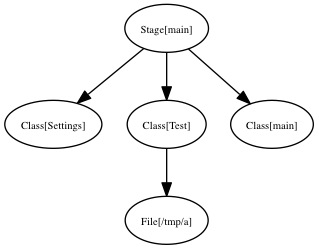
<p>Here is a simple manifest and the containment catalog that I obtained after compiling:</p>
<div class="language-ruby highlighter-rouge"><div class="highlight"><pre class="highlight"><code><span class="k">class</span> <span class="nb">test</span> <span class="p">{</span>
  <span class="n">file</span> <span class="p">{</span>
    <span class="s2">"/tmp/a"</span><span class="p">:</span> <span class="n">content</span> <span class="o">=&gt;</span> <span class="s2">"test!"</span>
  <span class="p">}</span>
<span class="p">}</span>

<span class="kp">include</span> <span class="nb">test</span>
</code></pre></div></div>

<p>And here is the produced catalog:</p>

<p><img src="/images/uploads/2012/03/containment-catalog.jpg" alt="Out of compiler containment catalog" title="Puppet: containment catalog" /></p>

<p>You’ll notice that as its name implies, the containment catalog is a graph of classes and resources that follows the structure of the manifest.</p>

<h2 id="when-facts-matter">When Facts matter</h2>

<p>In a master/agent system the facts are coming from the request in a serialized form. Those facts were created by calling <em>Facter</em> on the remote node.</p>

<p>Once unserialized, the facts are cached locally as YAML (as per the default terminus for facts on a master). You can find them in the <code class="language-plaintext highlighter-rouge">$vardir/yaml/facts/$certname.yaml</code> file.</p>

<p>At the same time the compiler catalog terminus compute some server facts that are injected into the current node instance.</p>

<h2 id="looking-for-the-node">Looking for the node</h2>

<p>In Puppet there are several possibilities to store node definitions. They can be defined by <code class="language-plaintext highlighter-rouge">node {}</code> blocks in the <code class="language-plaintext highlighter-rouge">site.pp</code>, by an <em>ENC</em>, into an LDAP directory, etc…</p>

<p>Before the compiler can start, it needs to create an instance of the <code class="language-plaintext highlighter-rouge">Puppet::Node</code> class, and fill this with the node informations.</p>

<p>The node indirection terminus is controlled by the <code class="language-plaintext highlighter-rouge">node_terminus</code> puppet settings which by default is <code class="language-plaintext highlighter-rouge">plain</code>. This terminus just creates a new empty instance of a <code class="language-plaintext highlighter-rouge">Puppet::Node</code>.</p>

<p>In an <em>ENC</em> setup, the terminus for the node indirection will be <code class="language-plaintext highlighter-rouge">exec</code>. This terminus will create a <code class="language-plaintext highlighter-rouge">Puppet::Node</code> instance initialized with a set of classes and global parameters the compiler will be able to use.</p>

<p>The <code class="language-plaintext highlighter-rouge">plain</code> terminus for nodes calls <code class="language-plaintext highlighter-rouge">Puppet::Node#fact_merge</code>. This methods <em>finds</em> the current set of Facts of this node. In the <code class="language-plaintext highlighter-rouge">plain</code> case it involves reading the YAML facts we wrote to disk in the last chapter, and merging those to the current node instance parameters.</p>

<p>Back to the compiler catalog terminus, this one tries to find the node with the given request information and if not present by using the node <code class="language-plaintext highlighter-rouge">certname</code>. Remember that the request to get a catalog from REST matches <code class="language-plaintext highlighter-rouge">/catalog/node.domain.com</code>, in which case the request key is <code class="language-plaintext highlighter-rouge">node.domain.com</code>.</p>

<h2 id="lets-compile">Let’s compile</h2>

<p>After that, we really enter the compiler code, when the compiler catalog terminus calls <code class="language-plaintext highlighter-rouge">Puppet::Parser::Compiler.compile</code>, which creates a new <code class="language-plaintext highlighter-rouge">Puppet::Parser::Compiler</code> instance giving it our node instance.</p>

<p>When creating this compiler instance, the following is created:</p>

<ul>
  <li>an empty catalog (an instance of <code class="language-plaintext highlighter-rouge">Puppet::Resource::Catalog</code>). This one will hold the result of the compilation.</li>
  <li>a companion top scope (an instance of <code class="language-plaintext highlighter-rouge">Puppet::Parser::Scope</code>)</li>
  <li>some other internal data structures helping the compilation</li>
</ul>

<p>If the given node was coming from an <em>ENC</em>, the catalog is bootstrapped with the known node classes.</p>

<p>Once done, the <code class="language-plaintext highlighter-rouge">compile</code> method is called on the compiler instance. The first thing done is to bootstrap top scope with the node parameters (which contains the global data coming from the <em>ENC</em> if one is used and the <em>facts</em>).</p>

<h2 id="remember-the-ast">Remember the AST</h2>

<p>When we left the <a href="/2011/12/27/puppet-internals-the-parser/">Parser post</a>, we obtained an AST. This AST is a tree of <code class="language-plaintext highlighter-rouge">AST</code> instances that implement the guts of the Puppet language.</p>

<p>In this previous article we left aside 3 types of AST:</p>

<ul>
  <li>Node AST</li>
  <li>Hostclass AST</li>
  <li>Definition AST</li>
</ul>

<p>Those are different in the sense that we don’t strictly evaluate them during compilation (more later on this step). No, those are <em>instantiated</em> as part of the <em>initial import</em> of the <em>known types</em>. If you’re wondering why I spelled the Class AST as Hostclass, then it’s because that’s how it is spelled in the Puppet code; the reason being that <code class="language-plaintext highlighter-rouge">class</code> is a reserved word in Ruby :)</p>

<p>Using a lazy evaluation scheme, Puppet keeps (actually per environments), a list of all the parsed known types (classes, definitions and nodes that the parser encountered during parsing); this is called the <em>known types</em>.</p>

<p>When this list is first accessed, if it doesn’t exist, Puppet triggers the parser to populate it. This happens in <code class="language-plaintext highlighter-rouge">Puppet::Node::Environment.known_resource_types</code> which calls the <code class="language-plaintext highlighter-rouge">import_ast</code> method with the result of the parsing phase.</p>

<p><code class="language-plaintext highlighter-rouge">import_ast</code> adds to the <em>known types</em> an instance of every definitions, hostclass, node returned by their respective <code class="language-plaintext highlighter-rouge">instantiate</code> method.</p>

<p>Let’s have a closer look of the hostclass <code class="language-plaintext highlighter-rouge">instantiate</code>:</p>

<div class="language-ruby highlighter-rouge"><div class="highlight"><pre class="highlight"><code><span class="k">def</span> <span class="nf">instantiate</span><span class="p">(</span><span class="n">modname</span><span class="p">)</span>
  <span class="n">new_class</span> <span class="o">=</span> <span class="no">Puppet</span><span class="o">::</span><span class="no">Resource</span><span class="o">::</span><span class="no">Type</span><span class="p">.</span><span class="nf">new</span><span class="p">(</span><span class="ss">:hostclass</span><span class="p">,</span> <span class="vi">@name</span><span class="p">)</span>
  <span class="n">all_types</span> <span class="o">=</span> <span class="p">[</span><span class="n">new_class</span><span class="p">]</span>
  <span class="n">code</span><span class="p">.</span><span class="nf">each</span> <span class="k">do</span> <span class="o">|</span><span class="n">nested_ast_node</span><span class="o">|</span>
    <span class="k">if</span> <span class="n">nested_ast_node</span><span class="p">.</span><span class="nf">respond_to?</span> <span class="ss">:instantiate</span>
      <span class="n">all_types</span> <span class="o">+=</span> <span class="n">nested_ast_node</span><span class="p">.</span><span class="nf">instantiate</span><span class="p">(</span><span class="n">modname</span><span class="p">)</span>
    <span class="k">end</span>
  <span class="k">end</span>
  <span class="k">return</span> <span class="n">all_types</span>
<span class="k">end</span>
</code></pre></div></div>

<p>So <code class="language-plaintext highlighter-rouge">instantiate</code> returns an array of <code class="language-plaintext highlighter-rouge">Puppet::Resource::Type</code> of the given type. You’ll notice that the hostclass code above analyzes its current class AST children for other ‘instantiable’ AST elements that will also end in the <em>known types</em>.</p>

<h2 id="known-types">Known Types</h2>

<p>The <em>known types</em> I’m talking about since a while all live in the <code class="language-plaintext highlighter-rouge">Puppet::Resource::TypeCollection</code> object. There’s one per Puppet environment in fact.</p>

<p>This object main responsibility is storing all known classes, nodes and definitions to be easily accessed by the compiler. It also watches all loaded files by the parser, so that it can trigger a re-parse when one of those is updated. It also serves as the Puppet class/module autoloader (when asking it for an unknown class, it will first try to load it from disk and parse it).</p>

<h2 id="scopes">Scopes</h2>

<p>Let’s open a parenthesis to explain a little bit what the scope is. The scope is an instance of <code class="language-plaintext highlighter-rouge">Puppet::Parser::Scope</code> and is simply a symbol table (as explained in the <a href="http://en.wikipedia.org/wiki/Compilers:_Principles,_Techniques,_and_Tools">Dragon Book</a>). It just keeps the values of Puppet variables.</p>

<p>It forms a tree, with the top scope (the one we saw the creation earlier) being the root of all scopes. This tree contains one child per new namespace.</p>

<p>The scope supports two operations:</p>

<ol>
  <li>Looking up a variable value</li>
  <li>Setting a variable value</li>
</ol>

<p>Look up is done with the <code class="language-plaintext highlighter-rouge">lookupvar</code> method. If the variable is qualified it will directly ask the correct scope for its value. For instance <code class="language-plaintext highlighter-rouge">::$hostname</code> will fetch directly the top scope fact <code class="language-plaintext highlighter-rouge">hostname</code>.</p>

<p>Otherwise it will either return its value in the local scope if it exists or delegate to the parent scope. This can happen up until the top scope. If the value can’t be found anywhere, the <code class="language-plaintext highlighter-rouge">:undef</code> ruby symbol will be returned.</p>

<p>Note that this dynamic scope behavior will be removed in the next Puppet version, where only the local scope and the top scope will be supported. More information is available in this <a href="http://docs.puppetlabs.com/guides/scope_and_puppet.html">Scope and Puppet article</a>.</p>

<p>Setting a variable is done with the <code class="language-plaintext highlighter-rouge">setvar</code> method. This method is called for instance by the AST class responsible of variable assignment (the <code class="language-plaintext highlighter-rouge">AST::VarDef</code>).</p>

<p>Along with regular variables, each scope has the notion of <em>ephemeral scope</em>. An <em>ephemeral scope</em> is a special transient scope that stores only regex capture <code class="language-plaintext highlighter-rouge">$0</code> to <code class="language-plaintext highlighter-rouge">$xy</code> variables.</p>

<p>Each scope level maintains a stack of <em>ephemeral scopes</em>, which is by default empty.</p>

<p>In Puppet there is no scopes for other language structures than classes (and nodes and definitions), so inside the following <code class="language-plaintext highlighter-rouge">if</code>, an ephemeral scope is created, and pushed on the stack, to store the result of the regex match:</p>

<div class="language-ruby highlighter-rouge"><div class="highlight"><pre class="highlight"><code><span class="k">if</span> <span class="vg">$var</span> <span class="o">=~</span> <span class="sr">/test(.*)/</span> <span class="p">{</span>
  <span class="c1"># here $0, $1... are available</span>
<span class="p">}</span>
</code></pre></div></div>

<p>When Puppet execution reaches the closing ‘}’, the <em>ephemeral scope</em> is popped from the <em>ephemeral scope</em> stack, removing the <code class="language-plaintext highlighter-rouge">$0</code> definition.</p>

<p><code class="language-plaintext highlighter-rouge">lookupvar</code> will also ask the <em>ephemeral scope</em> stack if needed.</p>

<p>Orthogonally, the scope instance will also store resource defaults.</p>

<h2 id="talking-about-ast-evaluation">Talking about AST Evaluation</h2>

<p>And here we need to take a break from compilation to talk about AST evaluation, which I elegantly eluded from the previous post on the Parser.</p>

<p>Every AST node (both branch and leaf ones) implements the <code class="language-plaintext highlighter-rouge">evaluate</code> method. This method takes a <code class="language-plaintext highlighter-rouge">Puppet::Parser::Scope</code> instance as parameter. This is the scope instance that is valid at the moment we evaluate this AST node (usually the scope associated with the class where the code we evaluate is).</p>

<p>There are several outcomes possible after evaluation:</p>

<ul>
  <li>Manipulation of the scope (like variable assignment, variable lookup, parser function call)</li>
  <li>Evaluation of AST children of this node (for instance <code class="language-plaintext highlighter-rouge">if</code>, <code class="language-plaintext highlighter-rouge">case</code>, selectors need to evaluate code in one their children branch)</li>
  <li>Creation of <code class="language-plaintext highlighter-rouge">Puppet::Parser::Resource</code> when encountering a puppet resource</li>
  <li>Creation of <code class="language-plaintext highlighter-rouge">Puppet::Resource::Type</code> (more puppet classes)</li>
</ul>

<p>When an AST node evaluates its children it does so by calling <code class="language-plaintext highlighter-rouge">safeevaluate</code> on them which in turn will call <code class="language-plaintext highlighter-rouge">evaluate</code>. Safeevaluate will shield the caller from exceptions, and transform them to parse errors that can specify the line and file of the puppet instruction that triggered the problem.</p>

<h2 id="shouldnt-we-talk-about-compilation">Shouldn’t we talk about compilation?</h2>

<p>Let’s go back to the compiler now. We left the compiler after we populated the <em>top scope</em> with the node’s facts, and we still didn’t properly started the compilation phase itself.</p>

<p>Here is what happens after:</p>

<ol>
  <li>Main class evaluation</li>
  <li>Node AST evaluation</li>
  <li>Evaluation of the node classes if any</li>
  <li>Recursive evaluation of definitions and collections (called generators)</li>
  <li>Evaluation of relationships</li>
  <li>Resource overrides evaluation</li>
  <li>Resource finish</li>
  <li>Ship the catalog</li>
</ol>

<p>After that, what remains is the containment catalog. This one will be transformed to a <em>resource</em> containment catalog. We call <em>resource catalog</em> an instance of <code class="language-plaintext highlighter-rouge">Puppet::Resource::Catalog</code> where all <code class="language-plaintext highlighter-rouge">Puppet::Parser::Resource</code> have been transformed to <code class="language-plaintext highlighter-rouge">Puppet::Resource</code> instances.</p>

<p>Let’s now see in order the list of operations we outlined above and that form the compilation.</p>

<h3 id="main-class-evaluation">Main class evaluation</h3>

<p>The main class is an hidden class where every code outside any definition, node or class ends. It’s a kind of top class from which any other class is inner. This class is special because it has an <em>empty name</em>.</p>

<p>Evaluating the main class means:</p>

<ol>
  <li>Creating a companion resource (an instance of <code class="language-plaintext highlighter-rouge">Puppet::Parser::Resource</code>) whose scope is the <em>top scope</em>.</li>
  <li>Add this resource to the catalog</li>
  <li>Evaluating the class code of this resource</li>
</ol>

<p>Let’s focus on this last step which happens in <code class="language-plaintext highlighter-rouge">Puppet::Parser::Resource.evaluate</code>.
It involves mainly getting access to the <code class="language-plaintext highlighter-rouge">Puppet::Resource::Type</code> instance matching our class (its type in fact) from the <em>known types</em>, and then calling the <code class="language-plaintext highlighter-rouge">Puppet::Resource::Type.evaluate_code</code> method.</p>

<h4 id="evaluating-code-of-a-class">Evaluating code of a class</h4>

<p>I’m putting aside the main class evaluation to talk a little bit about code evaluation of a given class because that’s something we’ll see for every class or node during compilation.</p>

<p>This happens during <code class="language-plaintext highlighter-rouge">Puppet::Resource::Type.evaluate_code</code> which essentially does:</p>

<ol>
  <li>Create a scope for this class (unless we’re compiling the main class which already uses the <em>top scope</em>)</li>
  <li>Ask the class AST children to evaluate with this scope</li>
</ol>

<p>We saw in the <a href="/2011/12/27/puppet-internals-the-parser/">Puppet Parser post</a> how the AST was produced. Eventually some of those AST nodes will end up in the <code class="language-plaintext highlighter-rouge">code</code> element of a given puppet class (you can refer to the Puppet grammar and <code class="language-plaintext highlighter-rouge">Puppet::Parser::AST::Hostclass</code> for the code), under the form of an <code class="language-plaintext highlighter-rouge">ASTArray</code> (which is an array of AST nodes).</p>

<h3 id="node-evaluation">Node Evaluation</h3>

<p>As for the main class, the current node compilation phase:</p>

<ul>
  <li>ask the <em>known types</em> about the current node, and if none are found ask for a <em>default</em> node.</li>
  <li>creates a resource for this node, add it to the catalog</li>
  <li>evaluates this node resource</li>
</ul>

<p>This last evaluation will execute the given node AST code.</p>

<h3 id="node-class-evaluation">Node class evaluation</h3>

<p>If the node was provided by an ENC, the compiler will then evaluate those classes. This is the same process as for the main class, where for every classes we create a resource, add it to the catalog and then evaluate it.</p>

<h3 id="evaluation-of-generators">Evaluation of Generators</h3>

<p>In Puppet the generators are the entities that are able to spawn new resources:</p>

<ul>
  <li>collections, including storeconfig exported resources</li>
  <li>definitions</li>
</ul>

<p>This part of the compilation loops calling <code class="language-plaintext highlighter-rouge">evaluate_definitions</code> and <code class="language-plaintext highlighter-rouge">evaluate_collections</code>, until none of those produces new resources.</p>

<h4 id="definitions">Definitions</h4>

<p>During the AST code evaluation, if the compiler encounters a definition call, the <code class="language-plaintext highlighter-rouge">Puppet::Parser::AST::Resource.evaluate</code> will be called (like for every resource).</p>

<p>Since this resource comes from a definition, a type resource will be instantiated and added to the catalog. This resource will not be evaluated at this stage.</p>

<p>Later, when <code class="language-plaintext highlighter-rouge">evaluate_definitions</code> is called, it will pick up any resource that hasn’t been evaluated (which is the case of our definition resources) and evaluates them.</p>

<p>This operation might in turn create more unevaluated resources (ie new definition spawning more definition resources), which will be evaluated in a subsequent pass over <code class="language-plaintext highlighter-rouge">evaluate_definitions</code>.</p>

<h4 id="collections">Collections</h4>

<p>When the parser parses a collection which are defined like this in the Puppet language:</p>

<div class="language-ruby highlighter-rouge"><div class="highlight"><pre class="highlight"><code><span class="no">File</span> <span class="o">&lt;&lt;|</span> <span class="n">tag</span> <span class="o">==</span> <span class="s1">'key'</span> <span class="o">|&gt;&gt;</span>
</code></pre></div></div>

<p>it creates an AST node of type <code class="language-plaintext highlighter-rouge">Puppet::Parser::AST::Collection</code>. The same happen if you use the <code class="language-plaintext highlighter-rouge">realize</code> function.</p>

<p>Later when the compiler evaluate code and encounters this collection instance, it will create a <code class="language-plaintext highlighter-rouge">Puppet::Parser::Collector</code> and register it to the compiler.</p>

<p>Even later, during <code class="language-plaintext highlighter-rouge">evaluate_collections</code>, the <code class="language-plaintext highlighter-rouge">evaluate</code> method of all the registered collectors will be called. This method will either fetch exported resources from storeconfigs or virtual resources, and create <code class="language-plaintext highlighter-rouge">Puppet::Parser::Resource</code> that are registered to the compiler.</p>

<p>If the collector has created all its resources, it is removed from the compiler.</p>

<h3 id="relationship-evaluation">Relationship evaluation</h3>

<p>The current compiler holds the list of relationships defined with the <code class="language-plaintext highlighter-rouge">-&gt;</code> class of relationship operators (but not the ones defined with the <code class="language-plaintext highlighter-rouge">require</code> or <code class="language-plaintext highlighter-rouge">before</code> meta-parameters).</p>

<p>During code evaluation, when the compiler encounters the relationship AST node (an instance of <code class="language-plaintext highlighter-rouge">Puppet::Parser::AST::Relationship</code>), it will register a <code class="language-plaintext highlighter-rouge">Puppet::Parser::Relationship</code> instance to the compiler.</p>

<p>During the <code class="language-plaintext highlighter-rouge">evaluate_relationships</code> method of the compiler, every registered relationship will be evaluated. This evaluation simply adds the destination resource reference to the source resource meta-parameter matching the operator.</p>

<h3 id="resource-overrides">Resource overrides</h3>

<p>And the next compilation phase consists in adding all the overrides we discovered during the AST code evaluation. Normally overrides are applied as soon as they are discovered, but it can happen than an override (especially for collection overrides), can not be applied because the resources it should apply on are not yet created.</p>

<p>Applying an override consist in setting a given resource parameter to the overridden value.</p>

<h3 id="resource-finishing">Resource finishing</h3>

<p>During this phase, the compiler will call the <code class="language-plaintext highlighter-rouge">finish</code> method on every created resources.
This methods is responsible of:</p>

<ul>
  <li>adding resource defaults to the resource parameters</li>
  <li>tagging the resource with the current scope tags</li>
  <li>checking that resource parameter are valid</li>
</ul>

<h3 id="resource-meta-parameters">Resource meta-parameters</h3>

<p>The next step in the compilation process is to set all meta-parameter of our created resources, starting from the main class and walking the catalog from there.</p>

<h3 id="finish">Finish</h3>

<p>Once everything has been done, the compiler runs some checks to make sure all overrides and collections have been evaluated.
Then the catalog is transformed to a <code class="language-plaintext highlighter-rouge">Puppet::Resource</code> catalog (which doesn’t change its layout, just the instance of its vertices).</p>

<h1 id="conclusion">Conclusion</h1>

<p>I hope you now have a better view of the compilation process. As you’ve seen the compilation is a complex process, which is one of the reason it can take some time. But that’s the price to pay to produce a data only graph tailored to one host that can be applied on the host.</p>

<p>Stay tuned here for the next episode of my Puppet Internals series of post. The next installment will certainly cover the Puppet transaction system, whose role is to apply the catalog on the agent.</p>]]></content><author><name>Masterzen</name></author><category term="[&quot;puppet&quot;]" /><category term="puppet" /><category term="compiler" /><category term="puppet internals" /><category term="ruby" /><summary type="html"><![CDATA[And I’m now proud to present the second installation of my series of post about Puppet Internals:]]></summary></entry><entry><title type="html">Benchmarking Puppet Stacks</title><link href="https://www.masterzen.fr/2012/01/08/benchmarking-puppet-stacks/" rel="alternate" type="text/html" title="Benchmarking Puppet Stacks" /><published>2012-01-08T20:23:45+01:00</published><updated>2012-01-08T20:23:45+01:00</updated><id>https://www.masterzen.fr/2012/01/08/benchmarking-puppet-stacks</id><content type="html" xml:base="https://www.masterzen.fr/2012/01/08/benchmarking-puppet-stacks/"><![CDATA[<p>I decided this week-end to try the more popular <em>puppet master stacks</em> and benchmark them with puppet-load (which is a tool I wrote to simulate concurrent clients).</p>

<p>My idea was to check the common stacks and see which one would deliver the best concurrency. This article is a follow-up of my previous <a href="/2010/10/18/benchmarking-puppetmaster-stacks/">post about puppet-load and puppet master benchmarking</a></p>

<h2 id="methodology">Methodology</h2>

<p>I decided to try the following stacks:</p>

<ul>
  <li><em>Apache</em> and <em>Passenger</em>, which is the blessed stack, with MRI 1.8.7 and 1.9.2</li>
  <li><em>Nginx</em> and <em>Mongrel</em></li>
  <li><em>JRuby</em> with minzuno</li>
</ul>

<p>The setup is the following:</p>

<ul>
  <li>one <em>m1.large</em> ec2 instance as the master</li>
  <li>one <em>m1.small</em> ec2 instance as the client (in the same availability zone if that matters)</li>
</ul>

<p>To recap, m1.large instances are:</p>

<ul>
  <li>2 cpu with 2 virtual core each</li>
  <li>8 GiB of RAM</li>
</ul>

<p>All the benchmarks were run on the same instance couples to prevent skew in the numbers.</p>

<p>The master uses my own production manifests, consisting of about 100 modules. The node for which we’ll compile a catalog contains 1902 resources exactly (which makes it a big catalog).</p>

<p>There is no storeconfigs involved at all (this was to reduce setup complexity).</p>

<p>The methodology is to setup the various stacks on the master instance and run puppet-load on the client instance. To ensure everything is hot on the master, a first run of the benchmark is run at full concurrency first. Then multiple run of puppet-load are performed simulating an increasing number of clients. This pre-heat phase also make sure the manifests are already parsed and no I/O is involved.</p>

<p>Tuning has been done as best as I could on all stacks. And care was taken for the master instance to never swap (all the benchmarks involved consumed about 4GiB of RAM or less).</p>

<h2 id="puppet-master-workload">Puppet Master workload</h2>

<p>Essentially a puppet master compiling catalog is a CPU bound process (that’s not because a master speaks HTTP than its workload is a webserver workload). That means during the compilation phase of a client connection, you can be guaranteed that puppet will consume 100% of a CPU core.</p>

<p>Which essentially means that there is usually little benefit of using more puppet master processes than CPU cores on a server.</p>

<h2 id="a-little-bit-of-scaling-math">A little bit of scaling math</h2>

<p>When we want to scale a puppet master server, there is a rough computation that allows us to see how it will work.</p>

<p>Here are the elements of our problem:</p>

<ul>
  <li>2000 clients</li>
  <li>30 minutes sleep interval, clients evenly distributed in time</li>
  <li>master with 8 CPU core and 8GiB of RAM</li>
  <li>our average catalog compilation is 10s</li>
</ul>

<p>30 minutes interval means that every 30 minutes we must compile 2000 catalogs for our 2000 nodes. That leaves us with <code class="language-plaintext highlighter-rouge">2000/30 = 66</code> catalogs per minute.</p>

<p>That’s about a new client checking-in about every seconds.</p>

<p>Since we have 8 CPU, that means we can accommodate 8 catalogs compilation in parallel, not more (because CPU time is a finite quantity).</p>

<p>Since <code class="language-plaintext highlighter-rouge">66/8 = 8.25</code>, we can accommodate <em>8 clients per minute</em>, which means each client must be serviced in less than <code class="language-plaintext highlighter-rouge">60/8.25 = 7.27s</code>.</p>

<p>Since our catalogs take about 10s to compile (in my example), we’re clearly in trouble and we would need to either add more master servers or increase our client sleep time (or not compile catalogs, but that’s another story).</p>

<h2 id="results">Results</h2>

<h3 id="comparing-our-stacks">Comparing our stacks</h3>

<p>Let’s first compare our favorite stacks for an increasing concurrent clients number (increasing concurrency).</p>

<p>For setups that requires a fixed number of workers (<em>Passenger</em>, <em>Mongrel</em>) those were setup with 25 puppet master workers. This was fitting in the available RAM.</p>

<p>For <em>JRuby</em>, I had to use the at the time of writing <em>jruby-head</em> because of a bug in 1.6.5.1. I also had to comment out the Puppet execution system (in <code class="language-plaintext highlighter-rouge">lib/puppet/util.rb</code>).</p>

<p>Normally this sub-system is in use only on clients, but when the master loads the types it knows for validation, it also autoloads the providers. Those are checking if some support commands are available by trying to execute them (yes I’m talking to you rpm and yum providers).</p>

<p>I also had to comment out when puppet tries to become the puppet user, because that’s not supported under <em>JRuby</em>.</p>

<p><em>JRuby</em> was run with Sun java 1.6.0_26, so it couldn’t benefit from the invokedynamic work that went into Java 1.7. I fully expect this feature to improve the performances dramatically.</p>

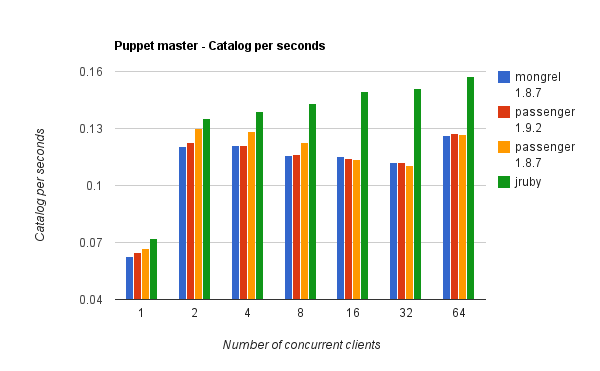
<p>The main metric I’m using to compare stacks is the <strong>TPS</strong> (<em>transaction per seconds</em>). This is in fact the number of catalogs a master stack can compile in one second. <strong>The higher the better</strong>. Since compiling a catalog on our server takes about 12s, we have TPS numbers less than 1.</p>

<p>Here are the main results:</p>

<p><img src="/images/uploads/2012/01/tps.png" alt="Puppet Master Stack / Catalog compiled per Seconds" title="Puppet stack TPS" /></p>

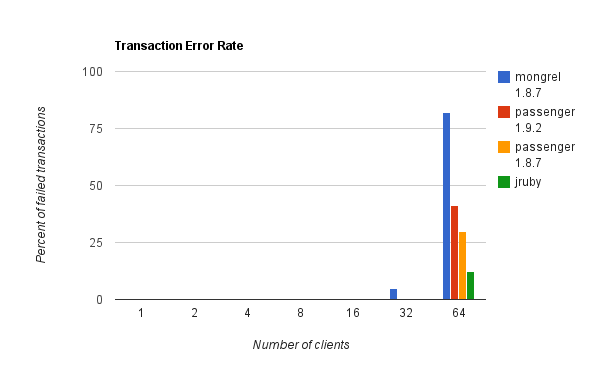
<p>And, here is the failure rate:</p>

<p><img src="/images/uploads/2012/01/failures.png" alt="Puppet Master Stack / Failure rate" title="Failure rate" /></p>

<p>First notice that some of the stack exhibited failures at high concurrency. The errors I could observe were clients timeouts., even tough I configured a large client side timeout (around 10 minutes). This is what happens when too many clients connect at the same time. Everything slows down until the client times out.</p>

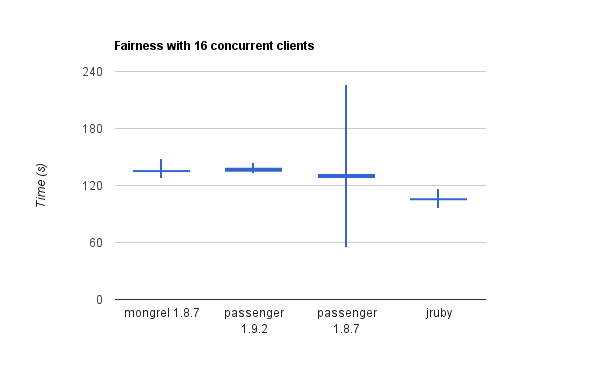
<h3 id="fairness">Fairness</h3>

<p>In this graph, I plotted the min, average, median and max time of compilation for a concurrency of 16 clients.</p>

<p><img src="/images/uploads/2012/01/fairness.png" alt="Puppet Master Stack / fairness" title="Fairness" /></p>

<p>Of course, the better is when min and max are almost the same.</p>

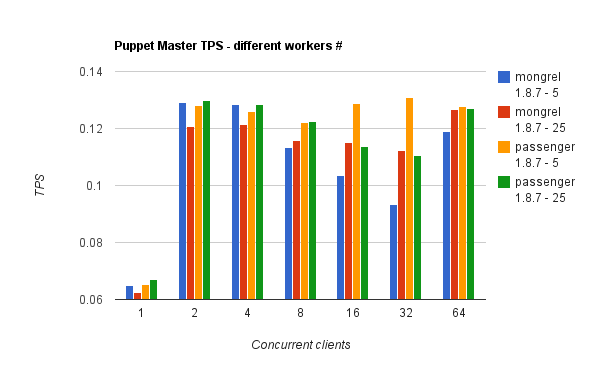
<h3 id="digging-into-the-number-of-workers">Digging into the number of workers</h3>

<p>For the stacks that supports a configurable number of workers (mongrel and passenger), I wanted to check what impact it could have. I strongly believe that there’s no reason to use a large number (compared to I/O bound workloads).</p>

<p><img src="/images/uploads/2012/01/workers.png" alt="Puppet Master Stack / Worker # influence" title="Workers # influence" /></p>

<h2 id="conclusions">Conclusions</h2>

<p>Beside being fun this project shows why Passenger is still the best stack to run Puppet. JRuby shows some great hopes, but I had to massage the Puppet codebase to make it run (I might publish the patches later).</p>

<p>That’d would be really awesome if we could settle on a corpus of manifests to allow comparing benchmark results between Puppet users. Anyone want to try to fix this?</p>]]></content><author><name>Masterzen</name></author><category term="[&quot;puppet&quot;]" /><category term="puppet" /><category term="benchmark" /><category term="passenger" /><category term="mongrel" /><category term="jruby" /><summary type="html"><![CDATA[I decided this week-end to try the more popular puppet master stacks and benchmark them with puppet-load (which is a tool I wrote to simulate concurrent clients).]]></summary></entry></feed>